structure fitter training 2

Structural Layout Diagonal Calculation Without Calculator
Please share post
Structural Layout Diagonal Calculation
Structural Layout Diagonal Calculation Without Calculator
How find triangle dimensions
How to find the hypotenuse dimension given the run and set dimension
Structural Layout Diagonal Calculation Without Calculator
स्ट्रक्चर फेब्रिकेशन लेआउट मार्किंग बिना कैलकुलेटर का हम कैसे मार्किंग करेंगे
अगर हम प्लांट के अंदर काम करते हैं और हमारे पास केलकुलेटर नहीं है और
मोबाइल नहीं है  तो हम कैसे लेआउट मार्किंग करेंगे

Structural Layout Diagonal Calculation Without Calculator

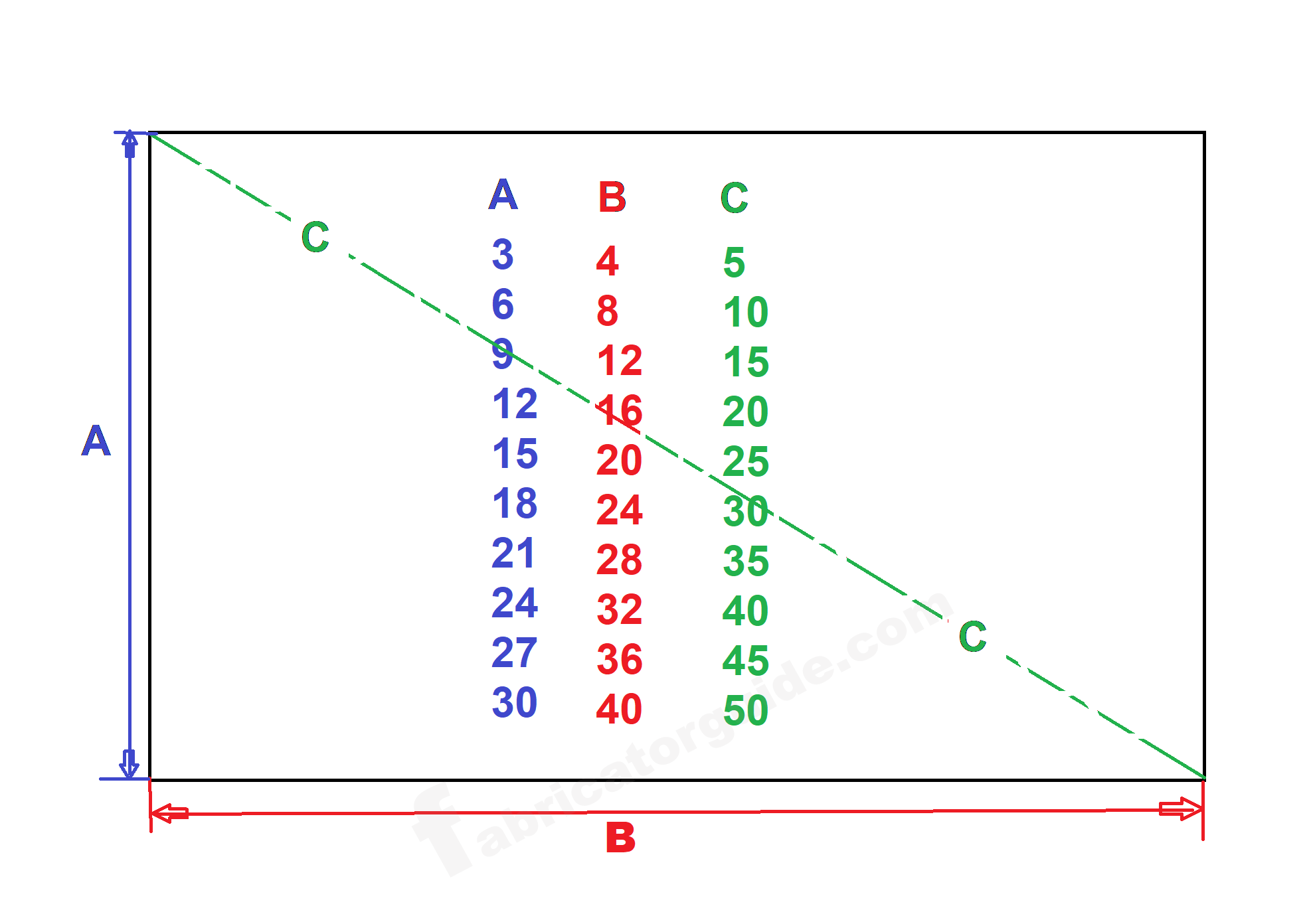
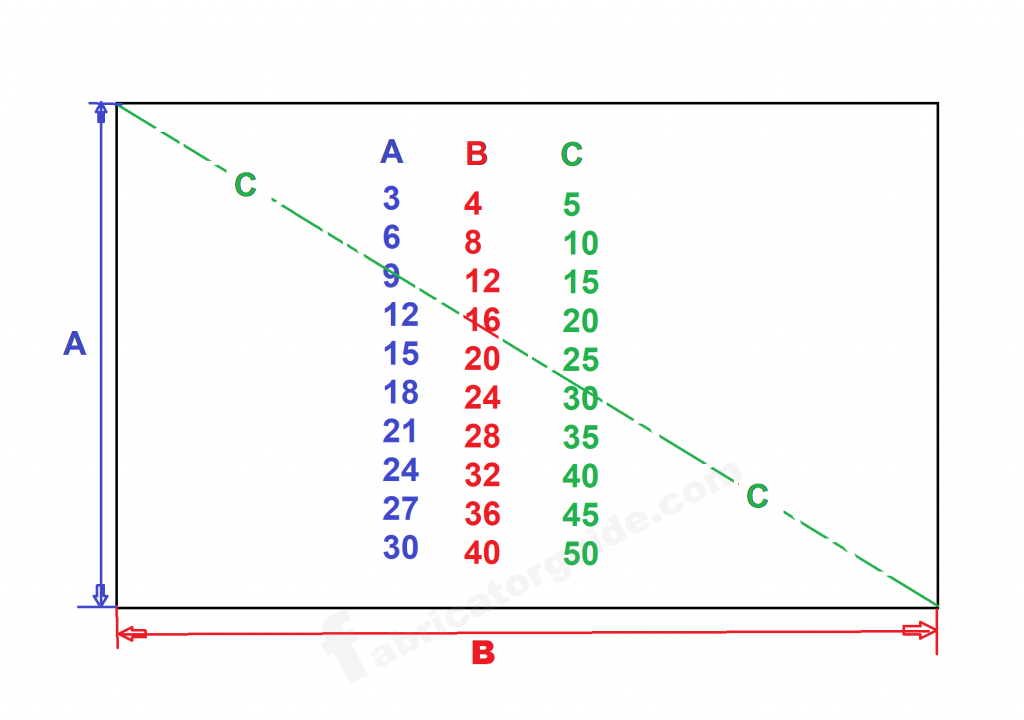
तो फ्रेंड जैसे आप यह देख रहे हैं फुटेज में इसमें तीन पहाड़ा का इस्तेमाल किया गया है
जैसे 3 का और 4 का और 5 का पहाड़ा है
पहला साइड मतलब A साइड हम मार्किंग करेंगे 3 का पहाड़ा और
दूसरा साइड मतलब B साइड हम मार्किंग करेंगे 4 का पहाड़ा
आप  कितना भी जीरो ले सकते हैं
जैसे 3 का पहाड़ा मे  3 + 000 ले लिए  = 3000
और दूसरी तरफ भी जैसे 4 का पहाड़ा मे  4 + 000 ले लिए  = 4000
कितना भी आप 0 बढ़ा सकते हैं 
उसका आंसर 5000 मीटर होगा
इसी तरीका से आप कितना भी बड़ा लेआउट मार्किंग करना हो यह फार्मूला के जरिए आप मार्किंग कर सकते हैं

So, friend, as you’re seeing in the footage, three tables are used.

For example, there are tables of 3, 4, and 5.

On the first side, i.e., side A, we’ll mark the table of 3, and

On the second side, i.e., side B, we’ll mark the table of 4.

You can add any number of zeros.

For example, in the table of 3, you add 3 + 000 = 3000.

And on the other side, for example, in the table of 4, you add 4 + 000 = 4000.

You can add any number of zeros.

The answer will be 5000 meters.

In this way, you can mark any large layout using this formula.

Structural Layout Diagonal Calculation Without Calculator

A  side multiplication table of 3 

B  side multiplication table of 4

C side  multiplication table of 5

A 3000   B 4000   answer C 5000


अगर साइज बढ़ाना हो तो अंक में 00000 बढ़ा सकते हैं

अगर आप लॉन्ग डाइमेंशन में मार्किंग करना चाहते हैं लेआउट तो आप उसमें जीरो बढ़ा सकते हैं

दोनों साइड डाइमेंशन में 0 एक बराबर बढ़ाना होगा

If you want to increase the size, you can increase the number by 00000.

If you want to mark in long dimension of layout then you can increase zero in it.

0 will have to be increased equally in both side dimensions

हमारे पोस्ट को पढ़ने के लिए बहुत-बहुत धन्यवाद और शुक्रिया 

Thanks for visit my website
 

fitter formula

Piping and structural fitter formula Pipe fitter formula and training Pipe branch dummy support cut bank pdf chart Pipe fittings dimensions and pipe schedule pdf chart

2 thoughts on “Structural Layout Diagonal Calculation Without Calculator

Leave a Reply

Your email address will not be published. Required fields are marked *

error: Content is protected !!